

"The principle and maintenance of mouse micro switches"
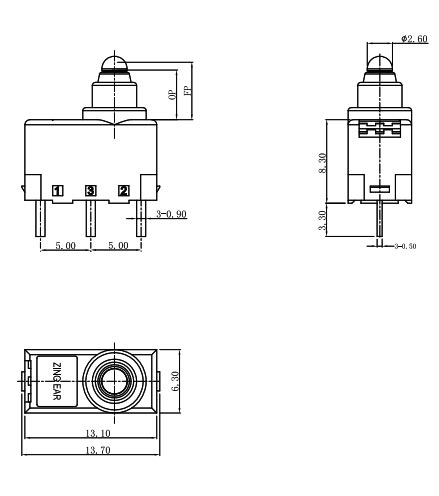
1、 Working principle of micro switch
The micro switch inside the mouse is a precision component triggered by a metal spring, whose core function is to convert physical button actions into electrical signals. The specific work process is as follows:
Trigger mechanism
When the mouse button is pressed, pressure is transmitted to the internal metal spring through transmission components such as buttons and levers. The silver dot at the front end of the spring contacts the contact foot below, forming a circuit conduction and sending an electrical signal to the computer.
Reset process
After releasing the button, the spring relies on its own elasticity to restore its original state, disconnect the circuit, and complete a complete click operation. This instantaneous action mechanism ensures the accuracy and stability of clicks.
Core function
Micro switches are essentially the core of mouse buttons, and the buttons on the shell are only auxiliary structures for convenient user operation. Modern micro switch technology has broken through the field of mice and is widely used in various electronic devices and toys.
2、 Structure and classification of micro switches
Size classification
Normal type: standard size, suitable for conventional equipment
Small/Ultra Small: Compact design, suitable for space constrained scenarios
Classification of protective performance
Waterproof type: prevents liquid from entering
Dustproof type: resistant to dust accumulation
Explosion proof type: suitable for high-risk environments
Classification of Breaking Forms
Single circuit control: Single circuit control
Dual/Multi Connection Type: Multi Circuit Synchronous Control
Strong disconnect type: When the spring fails, external force can still disconnect the circuit
Classification of Breaking Ability
Ordinary type: Conventional current carrying capacity
DC type: optimizing DC circuit control
Microcurrent/high current type: for special current requirements
Classification of usage environment
Normal type: used in regular environments
High temperature resistant type (250 ℃): suitable for high temperature environments
Ultra high temperature resistant ceramic type (400 ℃): extreme temperature environment
Classification of structural forms
Basic type: No auxiliary pressing attachment
Derivative type: small stroke/large stroke design
Auxiliary pressing accessory types: button type, spring roller type, lever roller type, short arm type, long arm type, etc
3、 Application fields of micro switches
Micro switches play a crucial role in multiple fields due to their precise structure and reliable performance
Consumer electronics: computer mice, car mice, communication devices, etc
Industrial control: testing instruments, gas water heaters, gas stoves, small appliances, etc
Military field: missiles, tanks, ships, aerospace, etc
Medical equipment: medical devices, building automation, etc
Daily appliances: microwave ovens, rice cookers, floating ball equipment accessories, etc

4、 The lifespan and material of micro switches
Mechanical lifespan
The mechanical lifespan of micro switches on the domestic market is usually between 30000 to 10 million cycles, and common specifications include:
100,000 times
200000 times
500,000 times
1 million times
3 million times
5 million times
8 million times
Material characteristics
Domestic commonly used materials: beryllium bronze, tin bronze, stainless steel wire
Foreign high-end materials: rare metal titanium (such as ALPS brand)
Domestic high-end representative: Tengfei Company uses special alloys with a maximum lifespan of 10 million cycles
5、 Repair methods for mouse micro switches
Fault diagnosis
When the mouse encounters the following issues, it is usually necessary to check the micro switch:
Button malfunction
Click insensitive
Poor hand feel
Abnormal noise or stuttering
Maintenance plan
Option 1: Cleaning and Restoration (Suitable for Mild Oxidation)
Applicable scenarios: 1-2 years of use, occasional double clicking of the mouse
Operation steps:
Remove the mouse shell and position the micro switch (usually a yellow or black square)
Clean the contact surface with an alcohol swab or WD-40 spray
Gently press a few times to reset the contact surface
Reinstall for testing
Attention: This method can only temporarily solve the problem, and oxidation issues may occur again.
Option 2: Replace micro motion (recommended, once and for all)
Applicable scenarios: Long term use or severely damaged mice
Operation process:
Preparation tools: Electric soldering iron, soldering tin, screwdriver, pry bar, replacement micro movement (about 0.5 yuan/piece)
Disassemble the mouse: tear open the foot pad, unscrew the hidden screws, and pry open the shell along the seam
Remove old micro movement: Heat the solder joint with an electric soldering iron and remove the damaged micro movement
Welding new micro motion: Align the new micro motion with the solder pad, solder the pins firmly, and avoid virtual soldering
Test installation: Connect the computer to test the click function, confirm it is normal, and then assemble it
Upgrade suggestion: Choose dust-proof micro motors (such as ZINGEAR, TTC dust-proof gold series), which can significantly extend the service life.
6、Summary
Although micro switches are small, they play a decisive role in mouse performance. Understanding its working principle and structural characteristics can not only help us use the mouse better, but also enable effective maintenance when problems arise. By replacing high-quality micro switches, we can rejuvenate old mice, improve user experience, and extend device lifespan.
Tags: Micro switch repair mouse button malfunction replace micro switch working principle of mouse micro switches micro switch replacement tutorial
Related Recommendations
-
ZINGEAR Micro Switch OEM Manufacturing Complete Guide
2026-07-23 -
ZINGEAR G306-150S150AA Automotive Micro Switch Officially Partners with Changan Automobile to Enable Precise Control of Sun Visors and Vanity Mirrors
2026-08-07 -
ZINGEAR G304 Micro Switch Debuts in Rail Transit Sector, Enabling Precise Sensing and Reliable Control for High-Speed Train Lifting Doors
2026-08-13 -
ZINGEAR G306-150E65BA-400 Electric Motorcycle Handbrake Micro Switch | Dreame Shouqu Certified Sensing Switch
2026-08-18 -
ZINGEAR G304 Micro Switch Supports Electric Two-Wheeler Electronic Lock Systems, Empowering Smart Lock Security and Durability Upgrade
2026-08-21 -
zingear Micro Switch Solution for Communication Base Station Equipment Status Detection — Building a Solid Safety Line for Long-term Stable Operation of Base Stations
2026-08-11 -
Electrolux Range Hood Switch Solution — Zing EAR: Solve Extreme Kitchen Reliability with Precision Sensing
2026-08-25 -
How can I replace the push-button switch on my range hood?
2026-08-27